> For the complete documentation index, see [llms.txt](https://doc.simax.fr/llms.txt). Markdown versions of documentation pages are available by appending `.md` to page URLs; this page is available as [Markdown](https://doc.simax.fr/parametrage/automatiser/les-automatismes-sur-action/envoi-automatique-de-message/amelioration-piece-jointe-dans-envoi-automatique-de-message.md).
# Amélioration pièce jointe dans envoi automatique de message
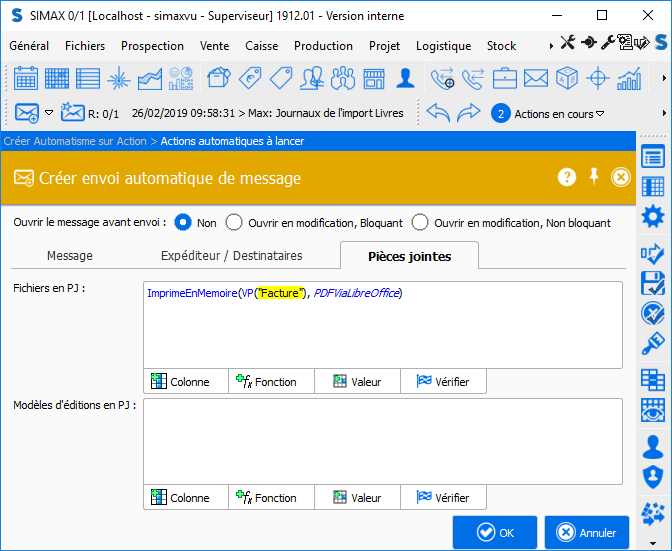
La formule des « Fichiers en PJ » d'un envoi automatique de message gère les types Fichier et Tableau de valeurs en plus du type texte (qui représente une liste de fichier séparé par des RC).
La formule utilise la fonction ImprimeEnMemoire(VP(), *PDFViaLibreOffice*).
Le type Fichier
La valeur de retour de la formule peut être un fichier alors celui-ci est mis en pièce-jointe du message.
Exemple :
ImprimeEnMemoire(VP("Facture"), *PDFViaLibreOffice*)
Va générer la facture en PDF et l'ajouter en pièce jointe.
Pas besoin de connaître le nom du fichier, etc.
IMG_P00511
Le type Tableau de valeurs
La valeur de retour de la formule est un tableau de valeur. Chaque valeur du tableau peut être soit :
\- un fichier
\- un texte qui est un chemin complet vers un fichier (Rappel : les jokers \* et ? sont autorisés) *(voir NV09N000170 Pièce jointe lors d'un envoie de message par automatisme)*
Exemple :
Tableau(
ImprimeEnMemoire(VP("Facture"), *PDFViaLibreOffice*),
"c:\temp\Mes conditions générales.pdf",
"c:\temp\mon iban.pdf"
)
Va générer la facture en PDF et l'ajouter en pièce jointe avec les 2 fichiers PDF.
###
---
# Agent Instructions
This documentation is published with GitBook. GitBook is the documentation platform designed so that both humans and AI agents can read, navigate, and reason over technical content effectively. Learn more at gitbook.com.
## Querying This Documentation
If you need additional information that is not directly available in this page, you can query the documentation by asking a question.
Perform an HTTP GET request on the following URL with the `ask` and `goal` query parameters:
```
GET https://doc.simax.fr/parametrage/automatiser/les-automatismes-sur-action/envoi-automatique-de-message/amelioration-piece-jointe-dans-envoi-automatique-de-message.md?ask=&goal=
```
`ask` is the immediate question: it should be specific, self-contained, and written in natural language.
`goal` is what the user is ultimately trying to achieve, the reason they need the answer. Sharing it helps GitBook give you a better, more relevant answer. A goal is most helpful when it describes the outcome the user wants rather than restating the question. For example, with `ask=how do I create an API token`, a goal like `automate deployments from our CI pipeline` lets GitBook tailor the answer to that use case.
The response will contain a direct answer to the question and relevant excerpts and sources from the documentation.
Use this mechanism when the answer is not explicitly present in the current page, you need clarification or additional context, or you want to retrieve related documentation sections.