> For the complete documentation index, see [llms.txt](https://doc.simax.fr/llms.txt). Markdown versions of documentation pages are available by appending `.md` to page URLs; this page is available as [Markdown](https://doc.simax.fr/documentation-simax-anglais/functional/management-of-stock-and-logistics/stock-management-and-valuation.md).
# Stock management and valuation
## Context:
PROBIO has opted for the weighted average price (PMP) method to value its stock.
The employee Aloé Vera made an initial manual entry for the yellow fruit basket item at a price of $100 per unit, followed by a second entry at a price of $50 per unit. Using the PMP method, the average price is calculated by taking the total value of the entries ($150 for 2 units), which gives a unit price of $75. Thus, the stock of the yellow fruit basket item is valued at $75 per unit.
PROBIO, as a producer specializing in fresh food, also offers refrigerators suitable for storing fruit and vegetables, organized by serial number for efficient management. Employee Barbier Bruno placed an initial order with his supplier CHILLO, at a price of €1,000 per unit, for a refrigerator with serial number 123, which he received upon arrival, and a second order at €500. He will then see that the stock lines for the two items, which do not have the same serial number, will be separated.
Thanks to this system, each entry is separate and stored with its own price, ensuring there is no confusion.
Red fruits are now managed by batch number at PROBIO. Employee Barbier Bruno manually recorded 10 baskets of red fruits at a price of 100 euros each, with batch number L100, followed by a second entry of 20 baskets at a price of 200 euros each, under batch number L200.
Subsequently, another employee, Blanchet Yves, added 10 additional baskets for the item with the same lot number L100 at €50 each.
Due to this increase in quantity for the same batch number, the pre-tax purchase price of L100 red berries has been adjusted to €75 per unit, which is the average price for this item.
## Implementation in SIMAX
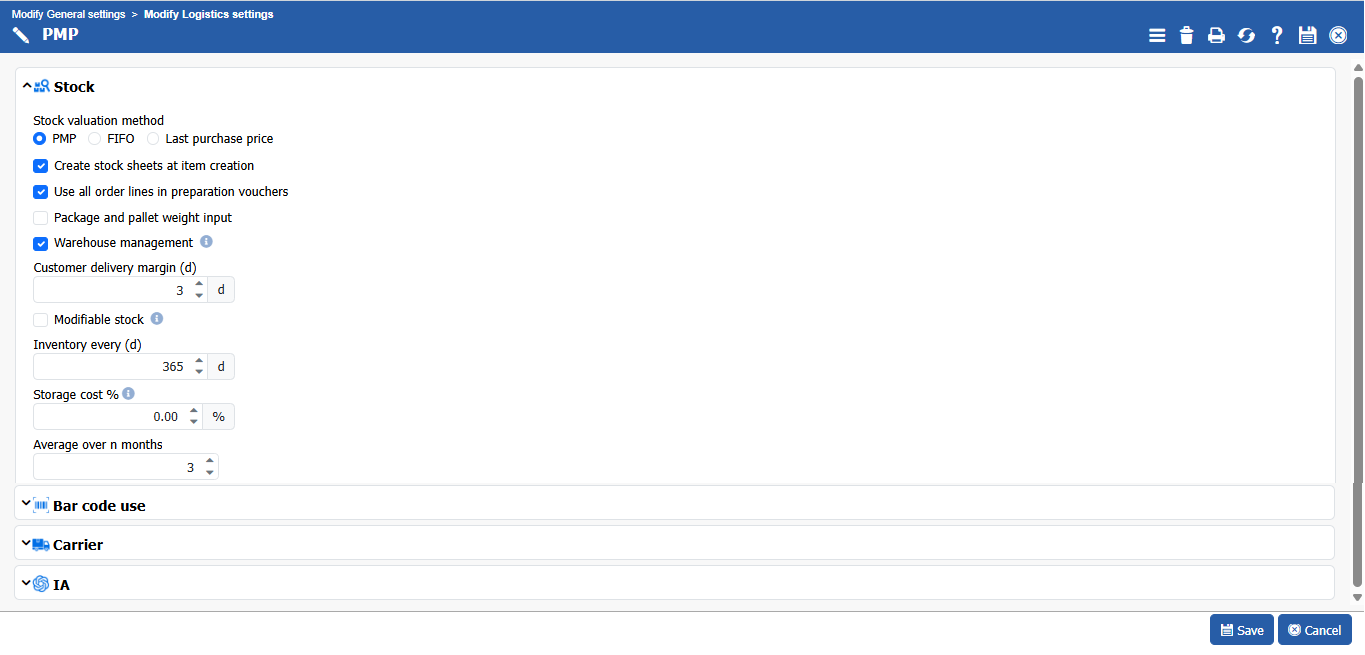
To choose the valuation method for your inventory, go to **Settings >Plug-ins and options, and \[\[Logistics]].**
As an example, here we have chosen Weighted Average Price (PMP).
### Simple item
You must now initialize the quantity in stock manually by making stock entries in **Stock > Movements > Create manual movement.**
To view stock levels, go to **Stock > Stock Status.**
{% hint style="info" %}
In the **Min. Qty** and **Max. Qty** fields in the **\[Supply]** section of the item's stock record, you can set stock management thresholds.The **minimum quantity** corresponds to the stock level that must be maintained to avoid any shortages, while the **maximum quantity** represents the ceiling that must not be exceeded in order to prevent overstocking.
When calculating replenishment, **Simax** will systematically seek to adjust quantities in order to reach the maximum stock level defined.The stock sheet cannot be modified by default.
Any changes to stock levels must be made via deliveries, receipts, or manual movements.However, if you want to allow direct modification of stock quantities, you must enable the **|Modifiable stock|** option in the logistics settings (**Settings > Plug-ins and options, \[\[Logistics]]).**
{% endhint %}
You can assign these quantities manually or use the ‘calculate minimum/maximum stock’ command (**Stock > Calculations > mini/maxi stock calculation).**
{% hint style="info" %}
In the establishment inventory list, all the stocks with quantities below the minimum quantity are shown in red.
{% endhint %}
To make a second entry for the item, follow the same path: **Stock> Movements > Create manual movement.**
**Save**, and now check the stock status of this item in **Stock > Stock status.**
You will have:
With the PMP method, the average price is calculated by taking the total value of the inputs (150 euros for 2 units), which gives a unit price of 75 euros. Thus, the stock of the yellow fruit basket item is valued at 75 euros per unit.
### Serialized items
Employee Barbier Bruno placed an initial order with his supplier CHILLO, at a price of 1,000 euros per unit, for a refrigerator with the serial number 123.
He then made a manual entry at 1,000 euros each.
And bring in another refrigerator for 500 euros.
Here, three stock lines have been created because the item is managed by serial number. This has also separated their respective prices.
### Items managed by batch number
Now, for items managed by lot numbers, always follow the same path to make a manual entry.
Provide only the necessary information about the item, especially the batch number.
To make a third manual entry, the path remains unchanged.
Here, the same item with the same lot number has been entered, but with a different price.
With PMP as the valuation method, only those with the same lot number are calculated together.
---
# Agent Instructions
This documentation is published with GitBook. GitBook is the documentation platform designed so that both humans and AI agents can read, navigate, and reason over technical content effectively. Learn more at gitbook.com.
## Querying This Documentation
If you need additional information that is not directly available in this page, you can query the documentation by asking a question.
Perform an HTTP GET request on the following URL with the `ask` and `goal` query parameters:
```
GET https://doc.simax.fr/documentation-simax-anglais/functional/management-of-stock-and-logistics/stock-management-and-valuation.md?ask=&goal=
```
`ask` is the immediate question: it should be specific, self-contained, and written in natural language.
`goal` is what the user is ultimately trying to achieve, the reason they need the answer. Sharing it helps GitBook give you a better, more relevant answer. A goal is most helpful when it describes the outcome the user wants rather than restating the question. For example, with `ask=how do I create an API token`, a goal like `automate deployments from our CI pipeline` lets GitBook tailor the answer to that use case.
The response will contain a direct answer to the question and relevant excerpts and sources from the documentation.
Use this mechanism when the answer is not explicitly present in the current page, you need clarification or additional context, or you want to retrieve related documentation sections.