> For the complete documentation index, see [llms.txt](https://doc.simax.fr/llms.txt). Markdown versions of documentation pages are available by appending `.md` to page URLs; this page is available as [Markdown](https://doc.simax.fr/documentation-simax-anglais/functional/items-and-pricing/item-types-and-item-families.md).

# Item types and item families

## Context:&#x20;

Alice has just landed a job as a catalog manager in a store.

The marketing department has assigned her the task of creating and adding new items in several categories.

She now has to enter these new products into her database to expand the store's offering.

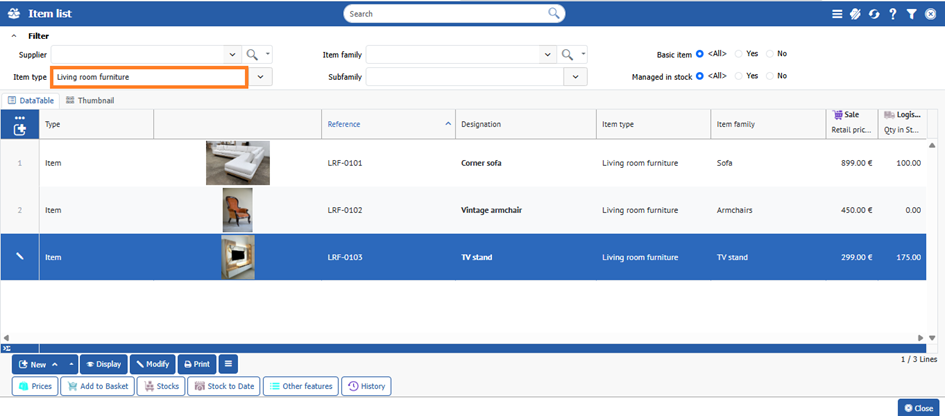
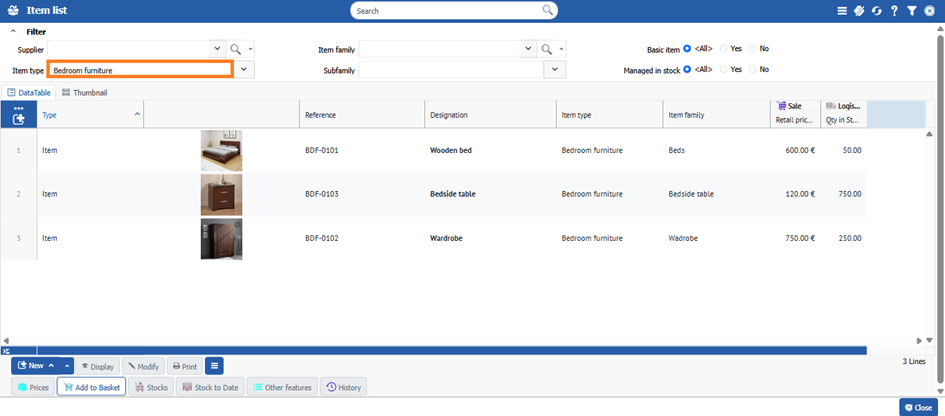
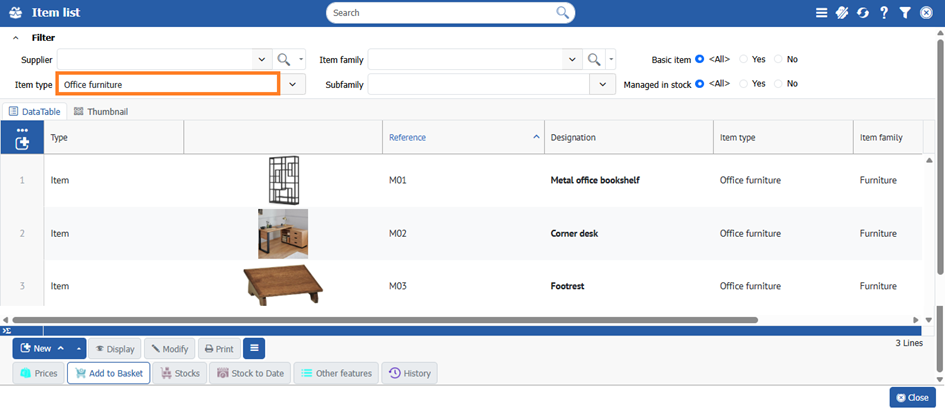
<table data-header-hidden><thead><tr><th valign="bottom"></th><th valign="bottom"></th><th valign="bottom"></th><th valign="bottom"></th></tr></thead><tbody><tr><td valign="bottom"><p> </p><p><strong>Item type</strong></p><p> </p></td><td valign="bottom"><p> </p><p><strong>Item family</strong></p><p> </p></td><td valign="bottom"><p> </p><p><strong>Item</strong></p><p> </p></td><td valign="bottom"><p> </p><p><strong>Price in Euro</strong></p><p> </p></td></tr><tr><td valign="bottom"><p> </p><p><strong>Living room furniture</strong></p><p> </p></td><td valign="bottom"><p> </p><p>Sofas</p><p> </p></td><td valign="bottom"><p> </p><p>Corner sofa</p><p> </p></td><td valign="bottom"><p> </p><p>           899,00 </p><p> </p></td></tr><tr><td valign="bottom"><p> </p><p>Armchair</p><p> </p></td><td valign="bottom"><p> </p><p>Vintage armchair</p><p> </p></td><td valign="bottom"><p> </p><p>           450,00 </p><p> </p></td><td valign="bottom"></td></tr><tr><td valign="bottom"><p> </p><p>TV furniture</p><p> </p></td><td valign="bottom"><p> </p><p>Well-mounted TV Unit</p><p> </p></td><td valign="bottom"><p> </p><p>           299,00 </p><p> </p></td><td valign="bottom"></td></tr><tr><td valign="bottom"><p> </p><p><strong>Bedroom furniture</strong></p><p> </p></td><td valign="bottom"><p> </p><p>Beds</p><p> </p></td><td valign="bottom"><p> </p><p>Wooden beds</p><p> </p></td><td valign="bottom"><p> </p><p>           600,00 </p><p> </p></td></tr><tr><td valign="bottom"><p> </p><p>Wardrobes</p><p> </p></td><td valign="bottom"><p> </p><p>Wardrobe with mirror</p><p> </p></td><td valign="bottom"><p> </p><p>           750,00 </p><p> </p></td><td valign="bottom"></td></tr><tr><td valign="bottom"><p> </p><p>Nightstands</p><p> </p></td><td valign="bottom"><p> </p><p>Scandinavian nightstand</p><p> </p></td><td valign="bottom"><p> </p><p>           120,00 </p><p> </p></td><td valign="bottom"></td></tr><tr><td valign="bottom"><p> </p><p><strong>Office furniture</strong></p><p> </p></td><td valign="bottom"><p> </p><p>Desks</p><p> </p></td><td valign="bottom"><p> </p><p>Corner desk</p><p> </p></td><td valign="bottom"><p> </p><p>           450,00 </p><p> </p></td></tr><tr><td valign="bottom"><p> </p><p>Office bookshelves</p><p> </p></td><td valign="bottom"><p> </p><p>Metal office bookshelf</p><p> </p></td><td valign="bottom"><p> </p><p>           230,00 </p><p> </p></td><td valign="bottom"></td></tr><tr><td valign="bottom"><p> </p><p>Office accessories</p><p> </p></td><td valign="bottom"><p> </p><p>Footrest</p><p> </p></td><td valign="bottom"><p> </p><p>             80,00 </p><p> </p></td><td valign="bottom"></td></tr></tbody></table>

## Implementation in SIMAX&#x20;

### Create item types and item families

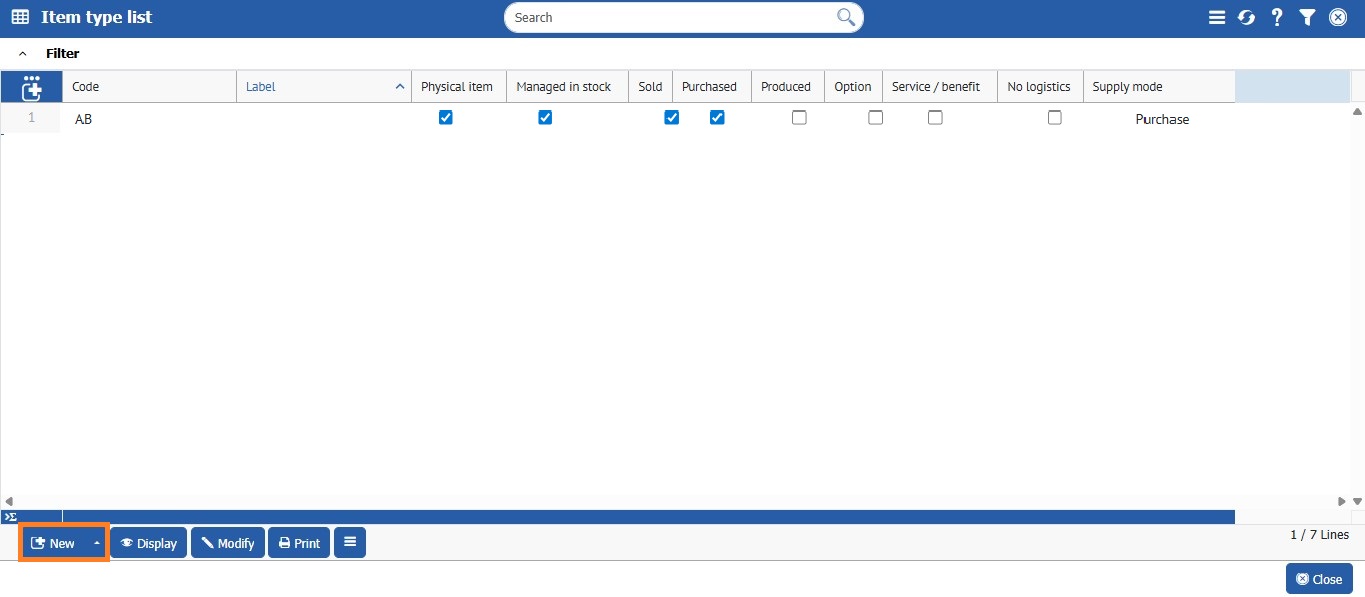
To create the various item types and their families, go to **Files > Item > Item Types** and click on **\[\[New]]**.

\
For now, we only have one item type.

<figure><img src="https://3774355255-files.gitbook.io/~/files/v0/b/gitbook-x-prod.appspot.com/o/spaces%2FzEcRYDc0Yd5qgDsaJt5p%2Fuploads%2FMQeikazx17by25AmxKUY%2Fab.jpg?alt=media&amp;token=8250d0b6-c23b-4faa-be91-5086364cac6b" alt=""><figcaption></figcaption></figure>

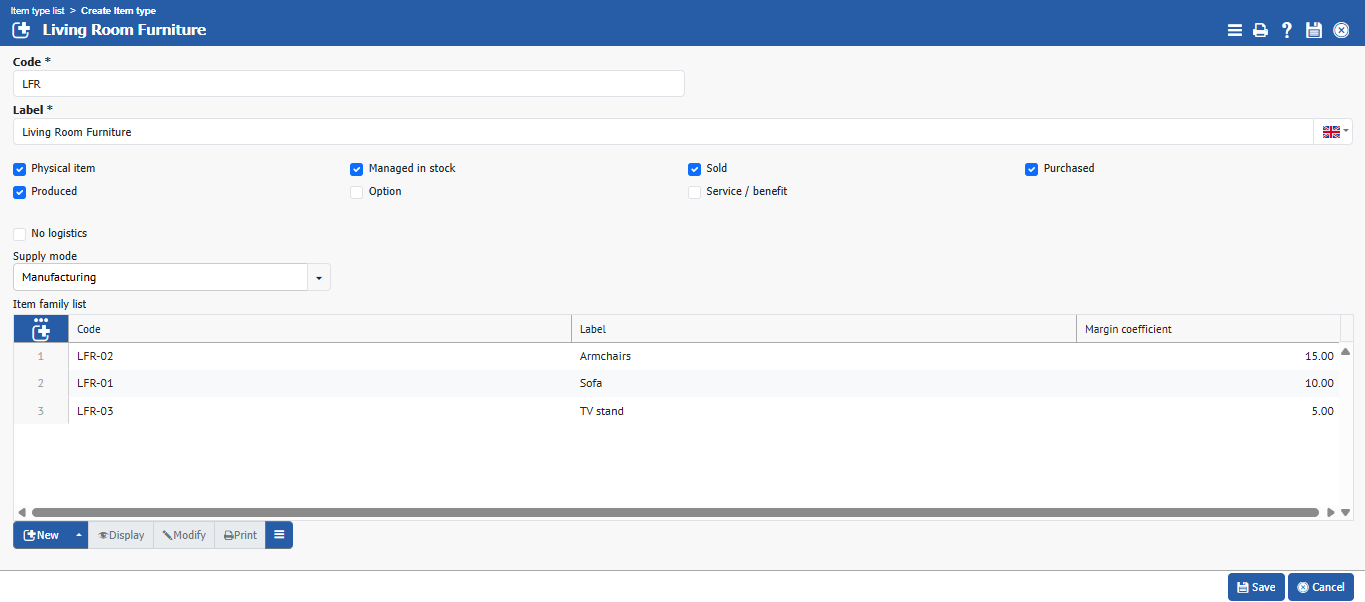
We will create the item type “Living Room Furniture” and the various related item families.

<figure><img src="https://3774355255-files.gitbook.io/~/files/v0/b/gitbook-x-prod.appspot.com/o/spaces%2FzEcRYDc0Yd5qgDsaJt5p%2Fuploads%2F65sW7XxtmaXQYkoQoCaj%2Fimage.png?alt=media&amp;token=1dbbe87d-d2d5-456e-9606-877d3927f5cf" alt=""><figcaption></figcaption></figure>

Fill in and check the boxes according to the type of item to be created, then click **\[\[Save]]**.

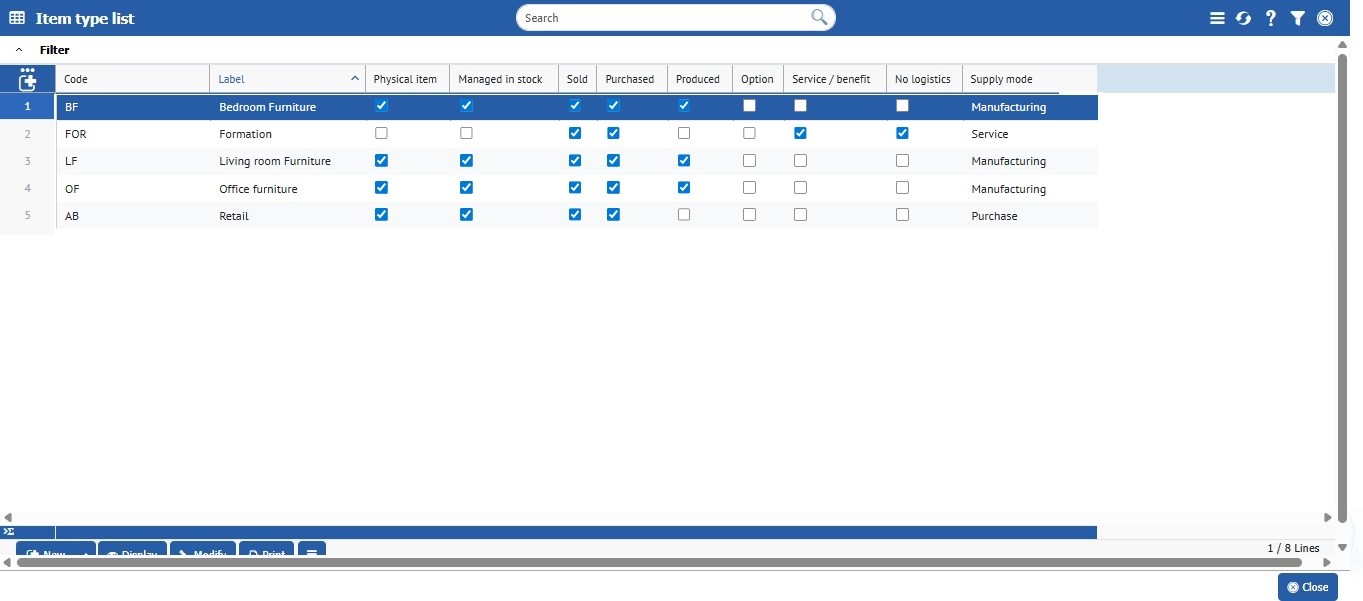
After creating all types of items, here is the expected result:

<figure><img src="https://3774355255-files.gitbook.io/~/files/v0/b/gitbook-x-prod.appspot.com/o/spaces%2FzEcRYDc0Yd5qgDsaJt5p%2Fuploads%2FDkLwmiXmZEDCvJi1yhEC%2FCapture%20d%E2%80%99%C3%A9cran%202025-12-08%20152151.jpg?alt=media&amp;token=3526023f-2e4b-4df2-aa4a-0d259f42eac4" alt=""><figcaption></figcaption></figure>

{% hint style="success" %}
Remark: You can also create subfamilies of items.
{% endhint %}

### Items creation

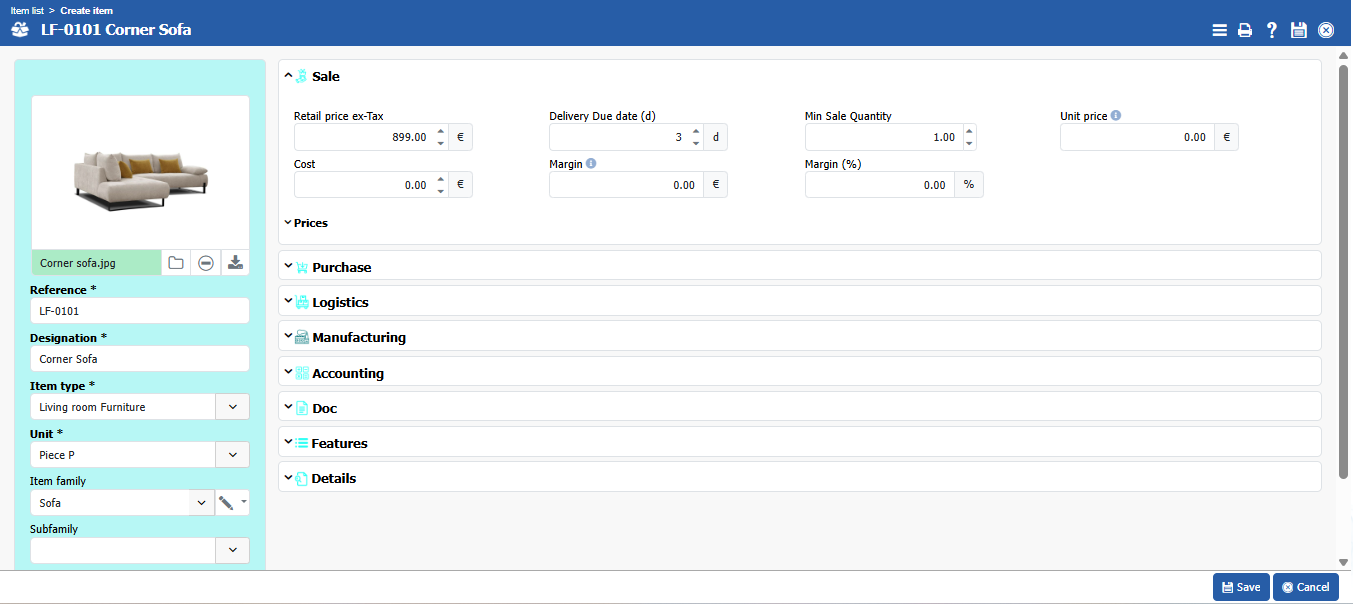
To create an item, go to **Files > Item > Items** and then **\[\[New]]**.

<figure><img src="https://3774355255-files.gitbook.io/~/files/v0/b/gitbook-x-prod.appspot.com/o/spaces%2FzEcRYDc0Yd5qgDsaJt5p%2Fuploads%2FrPVoPkavFgdR1B2U79lU%2Fimage.png?alt=media&amp;token=41886bf2-d54f-4700-a442-e9050f20067b" alt=""><figcaption></figcaption></figure>

Fill in the different tabs according to the item created.

**\[Sales]**: You can view the ERP 6 Commercial Management document;

**\[Purchasing]**: You can view the ERP 7 Purchasing document;

**\[Logistics]:** You can view the ERP 9 stocks management & Logistics;

**\[Production]:** You can view the ERP 11 Production document.

**\[Accounting]:** You can view the ERP 15 Accounting management and ERP 33 Tax nature document;

**\[Doc]:** You can view the ERP 23 EDM document;

**\[Feature]:** You can view the ERP 16 Quality document;

**\[Detail]:** You can view the description, history, and identification details for international shipments (customs code and country of origin).

And finish by clicking **\[\[Save]]**.

You will find all the items created according to the item type here.

<figure><img src="https://3774355255-files.gitbook.io/~/files/v0/b/gitbook-x-prod.appspot.com/o/spaces%2FzEcRYDc0Yd5qgDsaJt5p%2Fuploads%2Ff3SpIv7Dfmtf4ndKih55%2Fimage.png?alt=media&amp;token=b3aaba74-edc9-4965-87da-d62980456fc9" alt=""><figcaption></figcaption></figure>

<figure><img src="https://3774355255-files.gitbook.io/~/files/v0/b/gitbook-x-prod.appspot.com/o/spaces%2FzEcRYDc0Yd5qgDsaJt5p%2Fuploads%2FcaSPsbKJpufD0JnTnCCb%2Fimage.png?alt=media&amp;token=26616267-a633-418b-bb67-8febc802a5a7" alt=""><figcaption></figcaption></figure>

<figure><img src="https://3774355255-files.gitbook.io/~/files/v0/b/gitbook-x-prod.appspot.com/o/spaces%2FzEcRYDc0Yd5qgDsaJt5p%2Fuploads%2F6vsIDAmtShYP0R6WeZGV%2Fimage.png?alt=media&amp;token=4efc2b42-2142-4cc4-92a5-f4162c6eb9b1" alt=""><figcaption></figcaption></figure>


---

# Agent Instructions
This documentation is published with GitBook. GitBook is the documentation platform designed so that both humans and AI agents can read, navigate, and reason over technical content effectively. Learn more at gitbook.com.

## Querying This Documentation
If you need additional information that is not directly available in this page, you can query the documentation by asking a question.

Perform an HTTP GET request on the following URL with the `ask` and `goal` query parameters:

```
GET https://doc.simax.fr/documentation-simax-anglais/functional/items-and-pricing/item-types-and-item-families.md?ask=<question>&goal=<user_goal>
```

`ask` is the immediate question: it should be specific, self-contained, and written in natural language.
`goal` is what the user is ultimately trying to achieve, the reason they need the answer. Sharing it helps GitBook give you a better, more relevant answer. A goal is most helpful when it describes the outcome the user wants rather than restating the question. For example, with `ask=how do I create an API token`, a goal like `automate deployments from our CI pipeline` lets GitBook tailor the answer to that use case.

The response will contain a direct answer to the question and relevant excerpts and sources from the documentation.

Use this mechanism when the answer is not explicitly present in the current page, you need clarification or additional context, or you want to retrieve related documentation sections.